Learn to edit 360º photos with Photoshop, remove tripods, enhance skies, adjust colours, add branding and prepare panoramic images for publishing.
( 35 Reviews )
366 Students
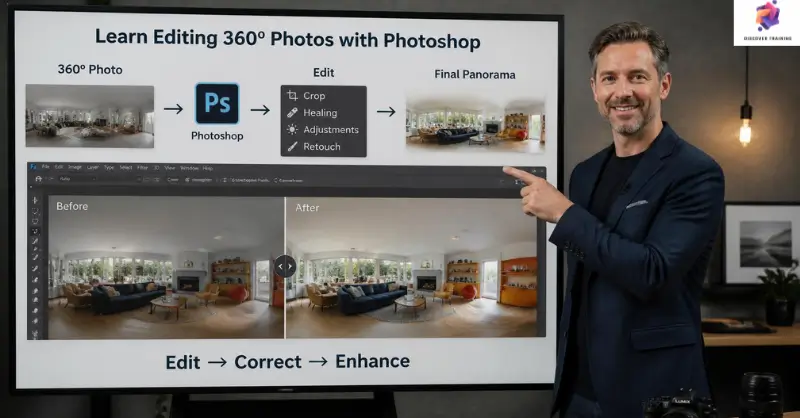
Editing 360º photos with Photoshop is a specialised course designed to help learners refine spherical panoramic images for polished digital presentation. You will explore the software, exercise files and workflow required to edit immersive photographs effectively. The lessons cover tripod isolation and removal, panorama retouching, sky replacement, lighting enhancement and colour adjustments. Furthermore, you will learn to add branding, prepare final JPEG files with metadata and upload panoramic images to Facebook. This structured course provides a clear route from initial image preparation through to final 360º photo delivery.
Turn ordinary panoramic captures into polished visual experiences with Learn Editing 360º Photos with Photoshop. This focused programme introduces a complete workflow for 360º photo editing, beginning with the essential software and exercise files. You will discover Photoshop 360º photo editing methods while exploring how to edit 360º photos in Photoshop efficiently. In addition, the lessons introduce Adobe Photoshop for beginners who want a clear route into immersive image production.
The course then moves into essential 360º image editing techniques, including tripod isolation, seamless removal, panorama centre-point correction and sky replacement. You will also explore a panoramic photo editing course workflow covering sunlight enhancement, colour correction and branding. Moreover, these lessons demonstrate how immersive photo editing can improve the visual quality and presentation of spherical photographs. The structured approach keeps each stage focused and accessible.
Finally, you will prepare a finished JPEG with metadata and learn how to upload spherical panoramas to Facebook. This Photoshop photo editing training helps you develop a consistent 360º photography workflow from editing through publication. Therefore, the course is suitable for learners seeking professional 360º image editing techniques for creative projects, online portfolios, social media content or photographic services.
Once the Learn Editing 360º Photos with Photoshop is successfully completed, the learner can obtain the PDF certificate without any cost. The hard copy of the certificate is also available for £4.99. However, anyone ordering the hard copy certificate from outside the United Kingdom may incur an additional delivery charge.
360º Photo Editor
Edit, retouch and prepare spherical photographs for digital platforms, virtual tours and creative projects.
Average Salary: £30,000 – £45,000 per year
Panoramic Photographer
Create and refine panoramic imagery for tourism, property, events and commercial campaigns.
Average Salary: £30,000 – £50,000 per year
Photo Retoucher
Improve photographs through colour correction, retouching, compositing and detailed image refinement.
Average Salary: £30,000 – £45,000 per year
Visual Content Creator
Produce engaging photographic assets for websites, social media, advertising and digital campaigns.
Average Salary: £30,000 – £48,000 per year
Virtual Tour Specialist
Prepare immersive imagery and panoramic assets for virtual property, tourism and commercial experiences.
Average Salary: £32,000 – £50,000 per year
Digital Imaging Specialist
Manage advanced image-processing workflows for photography, media production and visual communication.
Average Salary: £35,000 – £55,000 per year
It teaches learners how to edit, retouch, enhance and prepare spherical panoramic photographs using Photoshop.
Yes. The structured lessons introduce the workflow progressively, making it suitable for learners starting with Adobe Photoshop for beginners.
You will explore tripod removal, panorama correction, sky replacement, lighting, colour adjustments, branding and final JPEG preparation.
Yes. The techniques can support photographic portfolios, virtual tours, social media content and commercial panoramic projects.
Yes. The course includes preparing the final JPEG with metadata and uploading a spherical panoramic image to Facebook.
An outstanding online course with clear explanations and practical examples. I could study at my own pace and still feel fully supported throughout. It’s truly boosted my confidence and career prospects
The course was well-structured, engaging, and easy to follow. The flexibility made it perfect alongside my full-time job. I’ve gained valuable, real-world skills that I can apply immediately.
Excellent learning experience from start to finish. The content was professional, up-to-date, and highly relevant. I would highly recommend it to anyone looking to upskill online.
| Section 01: Introduction | |||
| Introduction | 00:01:00 | ||
| Software you’ll need | 00:01:00 | ||
| A brief intro to After Effects | 00:02:00 | ||
| About the exercise files | 00:01:00 | ||
| Section 02: Editing and Retouching a Spherical Panorama | |||
| Isolating the tripod area | 00:07:00 | ||
| Seamless tripod removal | 00:02:00 | ||
| Replacing tripod from bottom of sphere | 00:04:00 | ||
| Retouch and reset the panorama center point | 00:04:00 | ||
| Replacing the sky | 00:04:00 | ||
| Adding some sunshine | 00:07:00 | ||
| Making color adjustments | 00:02:00 | ||
| Adding a logo | 00:05:00 | ||
| Preparing Final JPEG file (with metadata) | 00:04:00 | ||
| Upload spherical panoramic to Facebook | 00:01:00 | ||
| Assignment | |||
| Assignment – Learn Editing 360º Photos with Photoshop | 00:00:00 | ||
Yes, Discover Training provides accredited and CPD-certified courses, ensuring learners receive recognised qualifications that support career progression and professional compliance.
Anyone can enrol, including students, professionals, job seekers, career changers, and organisations. Most courses do not require previous experience, making them accessible to learners at all levels.
Discover Training offers courses across multiple sectors, including business, health and safety, compliance, leadership, IT, personal development, and professional skills training.
You will have 14 days to revoke your Course purchase from your purchase date. Regrettably, refunds are not allowed after your purchase have been approved, and materials have been posted to the student’s dashboard or accessed.
Yes, learners receive a downloadable digital certificate upon successful completion, suitable for CPD records, CVs, and professional portfolios.
14-Day Money-Back Guarantee