
Learn to build a social media community website with WordPress, covering hosting, themes, plugins, profiles, groups, blogs, menus and events.
( 31 Reviews )
255 Students
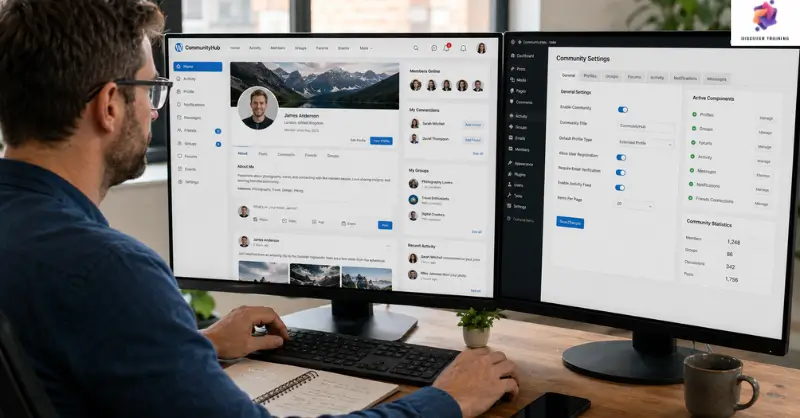
WordPress web development for social media community websites focuses on creating an interactive online platform where users can connect, communicate and participate in groups. This course introduces WordPress installation, domain and hosting setup, SSL configuration, themes and plugins. Furthermore, learners explore homepage design, user profiles, friend requests, groups, blogs, events, menus and contact features. The curriculum also covers newsletters, FAQs, footers and community functions. As a result, this WordPress web development course provides a structured route into building engaging community-focused websites.
A successful online community starts with a website that makes connection feel simple, purposeful and engaging. This WordPress web development course introduces the essential stages of creating a social media community website, from local installation through domain, hosting and SSL configuration. First, learners explore WordPress community website development before progressing into WordPress website design. They also discover how themes and plugins can shape the site’s appearance and functionality.
Next, the course develops skills in social networking website development, covering landing pages, calls to action, newsletters, profiles, user accounts, friend requests and groups. Meanwhile, WordPress for beginners concepts provide an accessible foundation for learners starting their website journey. The curriculum also introduces community website creation, menu structures, blogs, FAQs and contact pages. Therefore, learners can explore WordPress website customisation while building a more engaging digital environment.
Finally, learners examine events, group points and wider social media website development requirements. This programme supports WordPress development training through a structured website-building pathway. Consequently, the social media community website concept can be developed around communication, content and participation. In addition, WordPress community website development, WordPress website design and community website creation principles help learners explore how different features can work together within one connected platform.
Once the WordPress Web Development Social Media Community Website is successfully completed, the learner can obtain the PDF certificate without any cost. The hard copy of the certificate is also available for £4.99. However, anyone ordering the hard copy certificate from outside the United Kingdom may incur an additional delivery charge.
WordPress Developer
Builds, configures and maintains WordPress websites with customised features and integrations.
Average Salary: £40,000 – £60,000 per year
Web Developer
Creates and maintains functional websites using modern development technologies and content management systems.
Average Salary: £42,000 – £65,000 per year
Web Designer
Develops attractive layouts, navigation structures and visual interfaces for online platforms.
Average Salary: £40,000 – £55,000 per year
Digital Project Manager
Coordinates website projects, timelines, teams and digital delivery requirements.
Average Salary: £45,000 – £65,000 per year
UX Designer
Plans user journeys and interfaces to make websites easier and more engaging to navigate.
Average Salary: £45,000 – £65,000 per year
Digital Marketing Manager
Develops online campaigns and content strategies that support website visibility and audience growth.
Average Salary: £45,000 – £70,000 per year
A social media community website is an online platform where members can create profiles, connect with others, join groups, share content and participate in activities.
Yes. The programme introduces WordPress for beginners concepts, installation, themes, plugins and essential website-building processes.
WordPress community website development involves creating member-focused features such as user accounts, friend requests, groups, blogs and events.
Yes. The course explores WordPress website customisation through themes, plugins, menus, page structures and community-focused features.
WordPress development training can support pathways towards web development, WordPress development, web design, digital project management, UX design and digital marketing.
An outstanding online course with clear explanations and practical examples. I could study at my own pace and still feel fully supported throughout. It’s truly boosted my confidence and career prospects
The course was well-structured, engaging, and easy to follow. The flexibility made it perfect alongside my full-time job. I’ve gained valuable, real-world skills that I can apply immediately.
Excellent learning experience from start to finish. The content was professional, up-to-date, and highly relevant. I would highly recommend it to anyone looking to upskill online.
| Section 1 : Introduction | |||
| 1.1 Instructor Introduction | 00:03:00 | ||
| 1.2 Course Introduction | 00:06:00 | ||
| Section 2 : Installing Themes and Plugins | |||
| 2.1 Installing WordPress on Localhost | 00:12:00 | ||
| 2.2 Domain and Hosting | 00:08:00 | ||
| 2.3 WordPress and SSL Installation on Subdomain | 00:08:00 | ||
| 2.4 Website Walkthrough | 00:06:00 | ||
| 2.5 Installing Themes and Plugins | 00:08:00 | ||
| Section 3 : Create Homepage | |||
| 3.1 Landing Page | 00:15:00 | ||
| 3.2 2nd and 3rd Section of Homepage | 00:07:00 | ||
| 3.3 Call to Action | 00:08:00 | ||
| 3.4 Latest Post | 00:07:00 | ||
| 3.5 Newsletter | 00:06:00 | ||
| Section 4 : General Settings and User Profiles | |||
| 4.1 General Settings, Profile Fields, Create User Account and Friend Request | 00:20:00 | ||
| Section 5 : BuddyPress Settings | |||
| 5.1 Creating Groups | 00:05:00 | ||
| Section 6 : Create About Us Page | |||
| 6.1 About Us Page: Part-1 | 00:10:00 | ||
| 6.2 About Us Page: Part-2 | 00:10:00 | ||
| Section 7 : Create Contact us Page | |||
| 7.1 Contact Us Page | 00:15:00 | ||
| Section 8 : FAQ Page | |||
| 8.1 FAQ Page | 00:05:00 | ||
| Section 9 : Blog Page | |||
| 9.1 Blog Page | 00:03:00 | ||
| Section 10 : Menus | |||
| 10.1 Main Menu and Left Panel Menu | 00:07:00 | ||
| Section 11 : Footer | |||
| 11.1 Designing the Footer | 00:12:00 | ||
| Section 12 : Optional Features | |||
| 12.1 Creating Events and Group Points | 00:09:00 | ||
| Assignment | |||
| Assignment – WordPress Web Development: Social Media Community Website | 00:00:00 | ||
Yes, Discover Training provides accredited and CPD-certified courses, ensuring learners receive recognised qualifications that support career progression and professional compliance.
Anyone can enrol, including students, professionals, job seekers, career changers, and organisations. Most courses do not require previous experience, making them accessible to learners at all levels.
Discover Training offers courses across multiple sectors, including business, health and safety, compliance, leadership, IT, personal development, and professional skills training.
You will have 14 days to revoke your Course purchase from your purchase date. Regrettably, refunds are not allowed after your purchase have been approved, and materials have been posted to the student’s dashboard or accessed.
Yes, learners receive a downloadable digital certificate upon successful completion, suitable for CPD records, CVs, and professional portfolios.
14-Day Money-Back Guarantee

