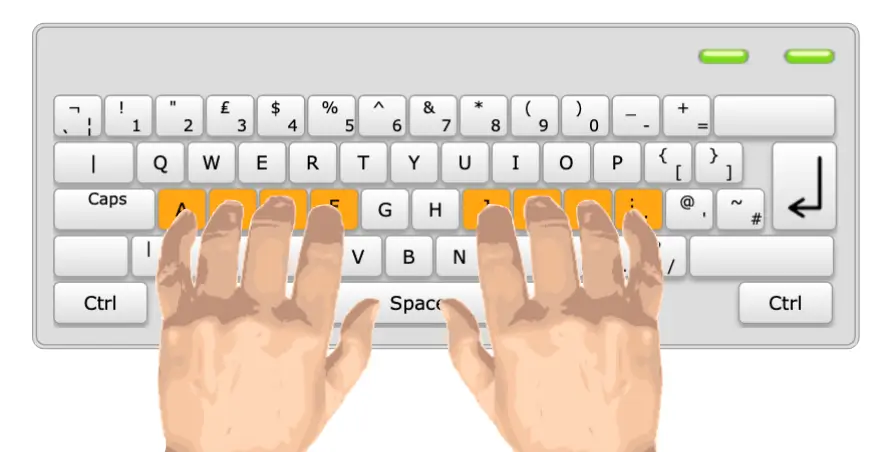
Touch typing is the ability to type using all ten fingers without looking at the keyboard. Unlike “hunt-and-peck” typing—where you search for each key with your eyes—touch typing relies on muscle memory and correct finger placement on the home row keys (ASDF for the left hand, JKL for the right).
Featured Snippet Definition: Touch typing is a keyboarding technique where typists use all ten fingers to type without looking at the keys, relying on muscle memory to achieve speeds of 60100+ words per minute with 9599% accuracy.
The technique was developed alongside the QWERTY keyboard layout, patented in 1868 by Christopher Latham Sholes. While the technology is ancient, the skill has never been more relevant. In 2026, touch typing separates efficient digital workers from those constantly battling their keyboards.
Why Touch Typing Matters Now More Than Ever
The Productivity Gap Is Widening
| Typing Method | Speed (WPM) | Time to Type 600 Words | Daily Productivity Impact |
|---|---|---|---|
| Hunt-and-peck (Beginner) | 20–30 | 20–30 minutes | Baseline |
| Average UK Adult | 40 | 15 minutes | Moderate |
| Proficient Touch Typist | 60–70 | 8–9 minutes | 2× faster |
| Advanced Professional | 80–100 | 6–7 minutes | 3–4× faster |
Research shows that improving typing speed from 30 WPM to 90 WPM can save nearly 2 hours per day—equivalent to 10 hours per week. Over a 40-year career, this adds up to approximately 7,800 hours saved, or nearly 4 years of working time.
The Data: Typing Speed Benchmarks by Profession
Typing Speed Tiers Explained
| Level | WPM Range | Typical Users | Career Impact |
|---|---|---|---|
| Beginner | Under 25 | Hunt-and-peck users, new typists | Limited job options |
| Average | 25–50 | General computer users | Below threshold for most professional roles |
| Proficient | 51–70 | Office workers, regular keyboard users | Meets minimum for most UK admin jobs |
| Advanced | 71–100 | Executive assistants, journalists, programmers | Competitive advantage, higher earning potential |
| Expert | 100+ | Professional transcriptionists, stenographers | Elite skill level, premium rates |
Understanding your typing speed level helps you identify career opportunities and areas for improvement. Moving from average to proficient can significantly increase your job prospects and productivity.
Key Benefits of Touch Typing in the Workplace
1. Dramatic Time Savings
A professional typing at 70 WPM completes documents 34 times faster than someone typing at 20 WPM. This isn’t marginal gain—it’s transformational. That 600-word report takes 8.5 minutes instead of 30 minutes.
2. Enhanced Accuracy and Quality
Touch typists make fewer errors because they develop finger-to-key automaticity. They catch mistakes immediately by watching the screen rather than the keyboard, enabling real-time correction.
3. Reduced Physical and Mental Fatigue
Hunt-and-peck typing requires constant visual switching between the screen and keyboard, creating cognitive load and neck strain. Touch typing maintains proper posture and reduces mental exhaustion—your fingers know where to go without conscious thought.
4. Improved Focus on Content, Not Mechanics
When typing becomes automatic, your working memory frees up for higher-order thinking. Research published in Frontiers in Psychology (2020) found that touch typing reduces cognitive load, enabling better focus on organising ideas and constructing arguments.
5. Professional Confidence and Employability
Touch typing certification on your CV signals digital literacy and professional competence to employers. In competitive job markets, this differentiator often determines interview selection.
Touch Typing for Remote Work and Digital Careers
The work-from-home economy has made self-sufficiency mandatory. Remote workers cannot walk to a colleague’s desk for quick typing assistance. They need independent keyboard productivity.
Remote Roles Where Touch Typing Is Essential
– Virtual assistants: 6080 WPM expected for real-time email management
– Online customer support: Live chat requires 60+ WPM for responsive service
– Content creation: Bloggers, copywriters, and journalists need 7090 WPM to meet deadlines
– Data entry and transcription: 80100 WPM with near-perfect accuracy
– Programming and development: While precision matters more than raw speed, 5070 WPM maintains coding flow
– E-learning and online education: Course creators type thousands of words weekly
The Digital Nomad Advantage
For location-independent professionals, typing speed directly correlates with income potential. Faster output means more client work completed per hour, enabling higher rates or shorter workweeks.
How to Learn Touch Typing: Step-by-Step Guide
Step 1: Master Home Row Position
Place your fingers on the home row keys:
– Left hand: Pinky on A, ring on S, middle on D, index on F
– Right hand: Index on J, middle on K, ring on L, pinky on ;
– Thumbs: Rest lightly on the spacebar
The F and J keys have raised bumps—these are your anchor points for returning to home position without looking.
Step 2: Learn FingertoKey Mapping
Each finger controls specific keys:
– Left pinky: Q, A, Z, Shift, Ctrl
– Left ring: W, S, X
– Left middle: E, D, C
– Left index: R, F, V, T, G, B
– Thumbs: Spacebar
– Right index: Y, H, N, U, J, M
– Right middle: I, K, comma
– Right ring: O, L, period
– Right pinky: P, semicolon, slash, Enter, Shift
Step 3: Practice Without Looking
Force yourself to stare at the screen, not the keyboard. Use a light cloth cover if necessary. Muscle memory develops through deliberate practice, not casual typing.
Step 4: Build Speed Gradually
Focus on accuracy before speed. Target 95% accuracy at 30 WPM before pushing for 40 WPM. Speed follows naturally once accuracy is automatic.
Step 5: Daily Structured Practice
1520 minutes of focused daily practice yield better results than hours of unfocused typing. Use typing tutors with structured lessons, not just random text.
Step 6: Test and Certify
Take formal typing tests to establish a baseline and track progress. Typing speed certification provides verifiable proof for employers.
Common Mistakes Beginners Make (And How to Avoid Them)
| Mistake | Why It Hurts | Solution |
|---|---|---|
| Looking at the keyboard | Prevents muscle memory development | Use a keyboard cover or blindfold technique until home row feels natural |
| Incorrect finger placement | Creates inefficiency and strain | Check hand position every 2 minutes during practice |
| Prioritising speed over accuracy | Builds bad habits, reduces Net WPM | Target 95%+ accuracy before increasing speed |
| Inconsistent practice | Skills regress between sessions | Schedule 15-minute daily sessions, not occasional long blocks |
| Ignoring ergonomics | Causes repetitive strain injury | Maintain neutral wrist position, use ergonomic keyboard if possible |
| Practicing with random content | Doesn't build pattern recognition | Use structured lessons that introduce keys systematically |
Note: Consistency and correct technique are more important than speed when building long-term typing skills.
Best Tools and Resources for Touch Typing Training
Online Typing Tutors
– Typing.com: Comprehensive free curriculum
– Keybr.com: Adaptive difficulty, focuses on weak keys
– Ratatype: Structured lessons with certification
– TypingClub: Gamified learning for beginners
Typing Test and Certification Platforms
– Official typing certification services: Provide verifiable credentials for job applications
– 10fastfingers: Competitive typing tests
– TypeRacer: Gamified speed practice
Software for Advanced Training
– KeyHero: Tracks detailed statistics
– NitroType: Racing-style practice for engagement
– TypingMaster: Structured professional curriculum
Ergonomic Equipment
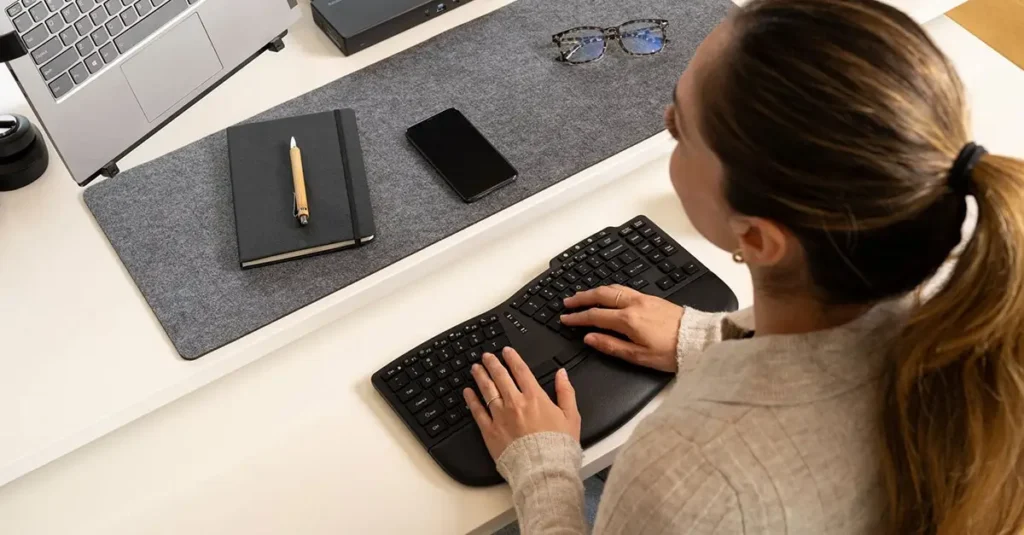
– Split keyboards: Reduce ulnar deviation (Microsoft Sculpt, Kinesis Advantage)
– Mechanical keyboards: Tactile feedback improves accuracy
– Adjustable stands: Maintain neutral wrist position
Certification Levels
Typing Certification Benchmarks and Career Use
| Certification Level | WPM | Accuracy | Typical Use |
|---|---|---|---|
| Foundation | 30–40 | 95% | Entry-level admin |
| Intermediate | 50–60 | 97% | General office roles |
| Advanced | 70–80 | 98% | Executive support |
| Professional | 90+ | 99% | Transcription, specialist roles |
Higher certification levels indicate stronger typing performance, which can significantly improve job opportunities, productivity, and earning potential in professional environments.
Learn Touch Typing with Professional Training
Course Overview
Professional touch typing training in the UK provides structured, accelerated learning for beginners and skill refinement for intermediate typists. CPD-accredited touch typing courses in the UK combine online modules with workplace competency assessment, ensuring you develop practical keyboard fluency that transfers directly to employment.
Key Benefits
– Structured curriculum: Progressive lessons from home row mastery to advanced speed building
– Accuracy focus: Build 9599% accuracy habits before speed acceleration
– Ergonomic technique: Learn proper posture and finger positioning to prevent strain
– Progress tracking: Detailed analytics identify weak keys and improvement areas
– Certification: Receive typing speed certification, UK employers recognise
– Flexible delivery: Learn touch typing from home in the UK with online modules combined with instructor feedback
Skills You Will Gain
Upon completing professional touch typing training for beginners in the UK, you will:
– Type at 6080 WPM with 95%+ accuracy
– Use the correct 10-finger technique without looking at the keyboard
– Maintain ergonomic posture for extended typing sessions
– Apply productivity shortcuts and navigation efficiency techniques
– Demonstrate certified competency for job applications
Career Opportunities
Touch typing certification for employment in the UK opens doors to:
– Administrative and executive assistant roles (5575 WPM required)
– Data entry and processing positions (65100 WPM required)
– Customer service and live chat support (6080 WPM expected)
– Content writing and digital marketing (7090 WPM preferred)
– Transcription services (80100+ WPM with certification)
– Remote work and virtual assistant careers (independent productivity essential)
– Business administration and office management (5060 WPM minimum)
Conclusion
Touch typing is not a nostalgic skill from the typewriter era—it is a fundamental digital competency that determines professional productivity in 2026. The data is unambiguous: professionals typing at 6090 WPM complete work 34 times faster than those stuck at 2030 WPM, with superior accuracy and reduced fatigue.
For UK job seekers and career advancers, the threshold is clear. 5060 WPM is the new minimum for administrative employability. 7090 WPM provides a competitive advantage. And certified touch typing skills increasingly separate candidates who secure interviews from those who don’t.
The investment is modest—1520 minutes of daily practice delivers measurable results within months. The return is substantial: hours saved weekly, improved work quality, reduced physical strain, and enhanced career mobility in an economy where digital fluency is nonnegotiable.
Whether you’re a student preparing for employment, a professional seeking remote work opportunities, or an administrator aiming for promotion, touch typing training UK provides one of the highest ROI skill investments available. The keyboard is not going away. Master it, and you master your productivity.
Frequently Asked Questions (FAQs)
Most UK office roles require 5060 WPM with 95% accuracy. Civil service admin positions typically specify 5060 WPM, while executive assistant roles prefer 75+ WPM .
With 1520 minutes of daily deliberate practice, beginners reach 5060 WPM in 36 months. Advancing from 60 to 80+ WPM requires an additional 36 months of focused drills .
Yes. Many UK employers, particularly in administration, data entry, legal services, and customer support, include typing speed tests in recruitment. Some require formal certification; others conduct live assessments.
For occasional computer users, yes. For professionals typing daily, no. Huntandpeck caps at approximately 30 WPM—below employability thresholds for most office roles .
Research shows touch typing reduces cognitive load by automating motor processes. This frees working memory for idea organisation, creative thinking, and complex problemsolving .