Touch typing is the ability to type using all ten fingers without looking at the keyboard. This skill relies on muscle memory—your fingers learn the exact location of each key through repetition, allowing you to type automatically while your eyes remain focused on the screen or source material.
Featured Snippet Definition: Touch typing is a method of typing using all ten fingers without looking at the keyboard, relying on muscle memory to locate keys. This technique enables speeds of 60-80+ words per minute with 95%+ accuracy, compared to 20-35 WPM for untrained typists.
Unlike “hunt-and-peck” typing, where you search visually for each key, touch typing engages the cerebellum—the brain’s “little brain” responsible for automatic motor skills. Once mastered, typing becomes as unconscious as riding a bike or walking, freeing your mind to focus on content rather than mechanics
Why Touch Typing Matters in the Digital Age
The Employability Imperative
In today’s technology-driven workplace, touch typing has become a fundamental employability skill. Microsoft research found that nearly a third of British employers are hesitant to hire individuals who cannot touch type, and 38% of employers recognise typing as a skill that enhances productivity.
The National Skills Coalition reported that 92% of jobs across industries now require digital skills, including typing proficiency. Many recruitment agencies now insist on typing tests before an interview, as corporations realise the benefits of work-ready employees.
The Education Revolution
With computers now allowed in exams (subject to access arrangements) and universities increasingly digital, students who cannot type efficiently face significant disadvantages. Research shows that students with specific learning disabilities (SLD) who learn touch typing significantly narrow the gap between keyboarding and handwriting speed, with keyboarding eventually becoming faster than handwriting for this group.

Key Benefits for Students
Academic Performance Enhancement
Students who master touch typing gain significant academic advantages:
Faster Note-Taking
Students who type notes during lectures tend to outperform peers who handwrite, particularly for capturing detailed information. The efficiency of typing allows for more complete lecture capture without sacrificing comprehension.
Improved Writing Quality
Research published in Computers & Education found that touch typing instruction improved writing outcomes for higher education students. While handwriting remained faster immediately after training, keyboarding surpassed handwriting speed within three months for students with specific learning disabilities.
Exam Success
With computers now permitted in many examinations, touch typing skills enable students to complete written exams more efficiently, allowing more time for thinking and reviewing rather than physical writing.
Cognitive Development Benefits
Touch typing supports student cognitive development through:
– Enhanced working memory—holding content in mind while typing exercises memory capacity
– Improved visual-motor integration—coordinating visual input with finger movements enhances overall skills
– Better language processing—rapid typing involves language comprehension and production, potentially improving overall language skills
– Increased cognitive flexibility—adapting to different keyboard layouts nurtures problem-solving capabilities
Accessibility and Inclusion
For students with dyslexia, dyspraxia, or autism, touch typing can be “completely liberating.” Using the cerebellum rather than conscious visual processing reduces visual stress and allows the “big brain” to concentrate on content and quality of writing rather than dividing attention between process and output.
Career Advancement Opportunities
| Career Path | Typing Speed Requirement | Why It Matters |
|---|---|---|
| Data Entry Specialist | 60–80 WPM | High-volume data processing demands speed |
| Medical / Legal Transcription | 65–100+ WPM | Real-time documentation requirements |
| Customer Support | 60–80 WPM | Live chat and email response efficiency |
| Content Creation | 60–90 WPM | Meeting tight editorial deadlines |
| Software Development | 40–70 WPM | Coding efficiency and documentation |
| Administration | 45–60 WPM | General office productivity |
Note: Higher typing speed combined with strong accuracy significantly improves productivity and career opportunities across industries.
Professional Competitiveness
The average typing speed in the UK is approximately 50 WPM, yet many professionals type at only 18-35 WPM using hunt-and-peck methods. Learning to touch type immediately distinguishes you from the majority of the workforce. Only 30% of the workforce can type effectively using all fingers at speeds greater than the average.
Time and Cost Savings
The productivity gains translate directly to business value:
A two-finger typist at 20 WPM takes 30 minutes to type a 600-word document. A trained touch typist at 70 WPM completes the same document in 8.5 minutes—saving over 21 minutes per document.
Over months and years, these compounds are broken down into weeks of regained productivity. Organisations with touch-typing employees deliver assignments faster, reduce work pressure, and stay ahead of the competition, irrespective of profession.
Cognitive and Brain Health Advantages
Whole-Brain Engagement
Touch typing uniquely engages all four brain hemispheres—both cerebral hemispheres and both cerebellar hemispheres—making skilled typists effectively ambidextrous. This whole-brain activation promotes:
– Neuroplasticity—forming new neural connections that strengthen with practice
– Enhanced verbal fluency—the cerebellum determines verbal fluency, grammar processing, and writing skills
– Improved attention and focus—sustained attention during typing sessions enhances overall attentional control
Flow State Facilitation
Touch typing may promote flow states—that feeling of being “in the zone” where work feels frictionless and free-flowing. The automaticity of typing frees cognitive resources, allowing ideas to flow from mind to screen without overthinking or writer’s block.
As one expert notes: “Something special happens when I’m touch typing really quickly that seems to engage my whole brain in a way that makes me a more fluid writer”.
Long-Term Cognitive Health
Mastering complex skills like touch typing contributes to cognitive reserve—the brain’s resilience against age-related cognitive decline. The procedural memory developed through typing, combined with continuous cognitive engagement, may offer protective benefits for long-term brain health.
The Speed Multiplier Effect
| Typing Method | Average Speed | Time for 600 Words | Time Saved |
|---|---|---|---|
| Hunt-and-peck | 20 WPM | 30 minutes | Baseline |
| Average typist | 40 WPM | 15 minutes | 15 minutes |
| Touch typist | 70 WPM | 8.5 minutes | 21.5 minutes |
| Professional | 100+ WPM | 6 minutes | 24 minutes |
Key insight: Doubling your typing speed from 40 to 80 WPM means completing work twice as fast—a multiplier effect that improves productivity across every email, report, and document.
Accuracy Equals Efficiency
Touch typing improves accuracy alongside speed. Because typists are extremely familiar with key locations through muscle memory, there are fewer mistakes, and corrections are made more quickly. This combined speed and accuracy dramatically boost overall workplace productivity.
Multitasking Capability
Touch typing enables genuine multitasking. Because fingers remain on the home row and typing becomes automatic, you can maintain focus on the screen while referring to source materials, participating in video calls, or analysing data—without the constant interruption of looking down at keys.
Health and Ergonomic Benefits
Posture and Physical Health
Touch typing promotes better ergonomic posture:
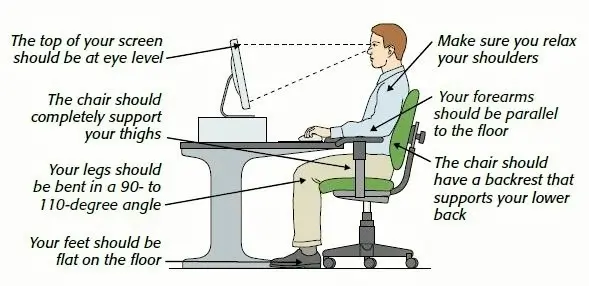
– Eyes remain focused forward on the screen rather than bending over the keyboard searching for keys
– Reduced neck and back strain from constant head movement
– Natural hand positioning prevents repetitive strain injuries
Research indicates that 45% of British workers lack knowledge of ergonomic typing, leading to typing-related injuries such as Repetitive Strain Injury (RSI). Proper touch typing technique significantly reduces these risks.
Reduced Mental and Physical Fatigue
Typing is exhausting when you must consciously search for each key. Touch typing reduces both mental and physical fatigue because it enables you to focus purely on content rather than the typing process itself.
The reduction in work pressure and physical strain means:
– More energy throughout the workday
– Ability to type for longer durations without discomfort
– Improved concentration on complex tasks
Confidence and Professional Presence
Mastering touch typing instils confidence in your digital abilities. In professional settings where fast, accurate typing is expected, this skill sets you apart as capable and proficient, conveying professionalism and competence.
Common Mistakes and How to Avoid Them
Mistake 1: Looking at the Keyboard
The Problem: Constantly checking key positions prevents muscle memory formation and maintains slow, conscious typing.
The Solution: Trust the home row position (F and J bumps) and accept initial frustration. Cover your hands if necessary until muscle memory develops.
Mistake 2: Using Incorrect Finger Placement
The Problem: Developing “bad habits” by using the wrong fingers for specific keys creates inefficiency and limits speed potential.
The Solution: Learn correct hand position from the start: left hand on ASDF, right hand on JKL, thumbs on spacebar. Each finger has assigned keys—stick to them.
Mistake 3: Prioritising Speed Over Accuracy
The Problem: Racing to increase WPM creates errors that require correction, negating time saved.
The Solution: Maintain the rule: do not increase speed until you achieve 95%+ accuracy at your current pace. Fix technique, not just tempo.
Mistake 4: Irregular Practice Patterns
The Problem: Occasional long practice sessions are less effective than consistent short sessions.
The Solution: Practice 10-15 minutes daily rather than 2 hours weekly. Consistency builds muscle memory more effectively than intensity.
Mistake 5: Neglecting Ergonomics
The Problem: Poor posture and wrist position lead to fatigue and potential injury.
The Solution: Maintain neutral wrist position, proper chair height, and take regular breaks. Ergonomic awareness is part of proper typing technique.
Best Tools and Resources for Learning
Beginner-Friendly Platforms
Typing.com — The reference standard for learning touch typing from scratch. Offers structured lessons, games, and progress tracking suitable for students and adults alike.
TypingClub — Comprehensive free courses with school-friendly features. Excellent for classroom integration or structured home learning.
English Type — Specialises in touch typing for students with special educational needs, using neuroscience-informed methods.
Intermediate and Advanced Practice
Keybr — Focuses on your specific mistakes and weak keys, accelerating progress once fundamentals are learned.
MonkeyType — Customisable practice with detailed statistics. Ideal for building speed beyond 60 WPM.
10FastFingers — Typing tests and competitions with achievement tracking for benchmarking progress.
Gamified Learning
NitroType — Racing games that make speed practice entertaining, particularly engaging for younger learners.
TypeRacer — Live racing against global typists. You’ll start winning races around 50 WPM, providing motivation to improve.
Learn Touch Typing with Professional Training
Course Overview
Professional touch typing training provides structured, expert-guided instruction to transform your typing from hunt-and-peck to fluid touch typing. Whether you’re a student preparing for university, a professional seeking career advancement, or someone looking to boost productivity, comprehensive typing skills training accelerates your progress far beyond self-taught methods.
Key Benefits
– Structured curriculum: Progressive lessons from home row through advanced techniques, ensuring no gaps in fundamentals
– Expert feedback: Identify and correct bad habits before they become entrenched, with personalised guidance
– Accelerated learning: Professional courses like KAZ enable you to learn the A-Z keys in just 90 minutes, plus practice time
– Certification: Document your typing speed for university applications and employment
– Career preparation: Meet WPM requirements for data entry, transcription, and professional roles
Skills You Will Gain
Upon completion of professional touch typing training, you will be able to:
– Type all letters, numbers, and symbols without looking at the keyboard
– Maintain 95%+ accuracy while building speed to 60-80+ WPM
– Use proper ergonomic technique to prevent strain and injury
– Apply strategies for continuous improvement beyond the course
– Demonstrate certified typing speeds for academic and professional applications
Career and Academic Opportunities
Touch typing certification supports:
– University success—efficient note-taking and exam completion
– Data entry and administration roles (60-80 WPM required)
– Medical and legal transcription (65-100+ WPM required)
– Customer support and live chat positions (60-80 WPM required)
– Content creation and journalism (60-90 WPM required)
– Software development and technical roles (40-70 WPM required)
Conclusion
The benefits of touch typing for students and professionals extend far beyond simple speed increases. This fundamental skill transforms how you interact with digital technology, enhancing academic performance, career prospects, cognitive health, and physical well-being.
For students, touch typing provides the tools to excel in an increasingly digital education landscape—enabling efficient note-taking, improved writing quality, and exam success while supporting cognitive development and accessibility for those with learning differences.
For professionals, touch typing is no longer optional but essential. With employers actively seeking candidates who can type efficiently, and with productivity gains that compound across every working day, this skill delivers immediate and lasting career advantages.
The cognitive benefits are equally compelling. By engaging all four brain hemispheres, promoting neuroplasticity, and facilitating flow states, touch typing enhances not just what you produce but how you think.
Whether you’re a student preparing for university, a professional seeking advancement, or simply someone looking to work more efficiently, investing in touch typing training yields returns that multiply across your entire digital life. The time saved, the errors prevented, and the cognitive clarity gained make touch typing one of the most valuable skills you can acquire in the modern world.
Start your touch typing journey today—your future self will thank you for every minute invested in this transformative skill.
Frequently Asked Questions (FAQs)
Touch typing enables faster note-taking, improved writing quality, better exam performance, and enhanced cognitive development. Students with specific learning disabilities particularly benefit, as keyboarding eventually surpasses handwriting speed. The skill also reduces visual stress and allows focus on content rather than mechanics .
Nearly a third of British employers hesitate to hire non-touch-typists, and 38% recognise typing as a productivity enhancer. Touch typing distinguishes you from the 70% of the workforce who cannot type effectively, opening doors to data entry, transcription, customer support, and content creation roles .
Yes. Research shows students with specific learning disabilities (dyslexia, dyspraxia, autism) benefit significantly. Touch typing uses the cerebellum rather than conscious visual processing, reducing visual stress and freeing cognitive resources for content and writing quality .
Untrained typists average 18-35 WPM using hunt-and-peck methods. After learning touch typing, speeds of 60-80 WPM are achievable, with professionals reaching 100+ WPM. This represents a 2-4x speed improvement with significantly higher accuracy .
Yes. With 92% of jobs requiring digital skills and computers increasingly used in examinations, touch typing should be integrated into education from primary level. Some schools now mandate lessons from years 5-6, focusing on proficiency by age 11 .